Page 16 of 16

Well Control Methods for Mac OS X Lion, release 1.3, now available on Mac App Store

Well Control Methods for Mac OS X (Lion Version)

WC3_Logo.png

Mac App Store

The Well Control for Mac provides to drillers, tool pushers, engineers, chemists, students and other professionals in Oil & Gas industry a productivity tool helpful in drilling of oil wells the understanding the methods of well control.

This application uses the basic calculations of the methods to control oil wells after the occurrence of kick during drilling operations on floating platforms and landing rigs.

Well Control Methods: 

1. Driller’s Method
2. Wait and Weight
3. Static Volumetric: Migration;
4. Static Volumetric: Lubricate and Bleed (Top Kill)
5. Dynamic Volumetric

New in this update:
Unit Systems Options: METRIC, SI, Oilfield 1 (Imperial), Oilfield 2

WC3_11_01_640.png

wellcontrol_url.png

contact@wellcontrol.com.br

http://www.wellcontrol.com.br

Well Control Methods for iPad, version 2.1.2, now available on the Mac App Store

Well Control Methods for iPad 2.1.2

WC3_150x150.png

On App Store

New in this update:

1. Fixes units of parameters: Kick Tolerance and ECD.
2. Fixes editing TVD on Vertical Well or Directional Mode.

This application uses the basic calculations of the methods to control oil wells after the occurrence of kick during drilling operations on floating platforms and land rigs.

It is can be applied in the oilfield of petroleum and also help in understanding the methods of well control.

Well Control Methods:

1. Driller’s Method
2. Wait and Weight
3. Dynamic Volumetric
4. Static Volumetric – Migration / Bleed
5. Static Volumetric – Lubricate / Bleed

WCM2_21_01b.PNG
WC2_211_03.png
WC2_211_05.png
WC2_211_07.png
WCM2_12_04.PNG
WCM2_12_05.PNG

wellcontrol_url.png

contact@wellcontrol.com.br

http://www.wellcontrol.com.br


Kick Tolerance for iPhone and iPod Touch, 2.2.1, now available on the iTunes App Store

Kick Tolerance for iPhone and iPod Touch

KT1_221_01.jpg

On iTunes App Store

New in this version:
1. Option to select unit systems: METRIC, SI, Imperial and OilField 2;
2. Bugs Fixes: Editing well and casing shoe TVD and bit depth.

Description

The Kick Tolerance provides the drilling engineers, chemists, students and other professionals in the petroleum industry a productivity tool helpful in drilling operation (well control) and planning phase of oil wells.

This application deals with two concepts:

1- Kick Tolerance as Maximum Pore Equivalent Weight;
2- Kick Tolerance as Maximum Kick Volume.

Both with graphical analyses.

KT1_21_01.PNG KT1_221_03.jpg
KT1_21_09.PNG KT1_21_12.PNG
KT1_21_02.PNG KT1_21_03.PNG
kt1_21_04.PNG KT1_21_05.PNG
wellcontrol_url.png

contact@wellcontrol.com.br


Kick Tolerance for iPad, release 2.2.1, now available on the iTunes App Store

Kick Tolerance for iPad, release 2.2.1

KTolerance_170x170_75.png

On the iTunes App Store

New in this version:
1. Option to select unit systems: METRIC, SI, Imperial and OilField 2;
2. Bugs Fixes: Editing well and casing shoe TVD and bit depth.

The Kick Tolerance provides to drilling engineers, chemists, technicians, students and others professionals in the Oil & Gas industry a productivity tool helpful in drilling operation (well control) and planning phase of oil wells.

This version is completely interactive and allows users to define a wide variety of parameters for oil wells, save data to files.

This application deals with two concepts:

1- Kick Tolerance as Maximum Pore Equivalent Weight;
2- Kick Tolerance as Maximum Kick Volume.

Both with graphical analyzes.

For both the concepts, the calculations uses the Fracture Gradient defined in “Well Configuration -> Gradients” views.

1. For KT as Maximum Pore Equiv Weight

– Plot KT x Maximum Kick Volume

KT (Maximum Pore Equiv Weight) = mudWeight + (casingShoe/wellDepth) * (Fract Equiv Weight – mudWeight) – (KickLength/wellDepth) * (mudWeight – kickDensity);

=> Known the Maximum Kick Volume, find the KT as the Maximum Pore Gradient;

2. For KT as Maximum Pit Gain Volume:

Plot KI = the difference ( Pore Equiv Weight – Mud Weight ) versus Maximum Kick Volume (Pit Gain)

KI (Pore Equiv Weight – Mud Weight)
= (casingShoe/wellDepth) * (Fract Equiv Weight – mudWeight) – (KickLength/wellDepth) * (mudWeight – kickDensity);

=> Known the difference (Pore Equiv Weight – Mud Weight), find the Kick Tolerance as Maximum Kick Volume.

Calculation of the Kick Tolerance by this App:

1. Hmax below the casing shoe = (MaxSICP – SIDPP) / (0.052 x (ρmud-ρkick));
– MaxSICP = 0.052 x (ρfracture – ρmud) x CasingShoeTVD
– SIDPP = 0.052 x KI x Well TVD
2. Calculate V1 = Maximum Volume annulus bellow the casing shoe;
3. Calculate V2 at bottom = (V1 x Pfracture) / Ppore;
4. Calculate V3 = Volume annulus at bottom using Hmax;

The kick tolerance is the smaller of the two volumes between V2 and V3.
This KT is showed in the Graph: KI versus KT Volume.

KT2_22_00b.PNG
KT2_22_01.PNG
KT2_22_04b.PNG
KT2_22_05.PNG
KT2_22_02b.PNG
KT2_22_03.PNG

wellcontrol_url.png

contact@wellcontrol.com.br

http://www.wellcontrol.com.br

Created new group on LinkedIn: Oil & Gas Systems

Oil & Gas Systems Group

wellcontrol_url.png

 A professional and networking group dedicated to the development of systems for Oil & Gas industry. My goal is to create a world wide network of Developers (Software & Automation) where they can share yours websites, products, new techniques, papers and news . This group is open to all.

link: http://www.linkedin.com/groups/Oil-Gas-Systems-4152498


Drilling Simulator for iPhone, release, 1.2, now available on the iTunes App Store

Drilling Simulator for iPhone – Introductory Level

iDrillSim_10_01.PNG

iTunes App Store

This App provides a graphical very useful tool for training of roughnecks, derrickmen, drillers and students in basics drilling concepts and in the kick detection based on the behavior of the parameters during the drilling an oil well and of the behavior of kick in the well after the shut-in the well.

New in this release:
– iOS5 Tested;
– Improvements with data input: now there is no need to tap [done] for each entry, only on the last text field.
– Option to select Vertical or Directional Well;
– Option to select unit systems: Metric, SI, Field1 (Imperial) and Field2 (mix);
– Improved the feature save/load data file;
– Added Drillcollar 2 on the drillstring;
– Save the graph in the data file;

Features: 

1) Panel with the following parameters: pump pressure, mud pump speed, strokes totalizer, flow rate, mud weight, bit depth, rotary speed, hookload and weight on the bit;
2) Instruments with pointers to the parameters: pump pressure, hookload, weight on the bit and rotary torque;
3) Geolograph with parameters: drillpipe pressure, choke pressure, active volume, hookload, weight on the bit, length drilled, flow in, flow out, percent of flow, rotary torque, rotary speed and drilling rate.
4) Panel with alarms: pump failure, vol high, flow high, bop failure, bop status and choke status;
5) Toolbar with buttons: Well Config, Circulation Options, Set Alarms, Graph Limits, X-times faster, Pause/Continue, Restart, Send by email, about;
6) set drillstring with drillpipe, heavy-weight, drillcollar1 and drillcollar2;
7) Select floating rig or land rig;
8) Select unit systems: METRIC, SI, field1 (imperial) and field2 (mix);
9) set fluid parameters: mud weight, plastic viscosity, yield point and initial gel;
10) Select rheological models: Power or Bingham;
11) Set gradients: fracture and temperature;
12) Set jet nozzles or fixed TFA;
13) Set choke parameters and BOP test pressure;
14) Set Surface circulation volume;
15) Set surface circulation equipments (mud pump and lines);
16) Set four formations to drilling (height, pore gradient, fluid density and sof/hard);
17) Save configuration to data files;
18) Select circulation options: drillpipe -> Riser, Kill -> Riser, Close/Open (Hard shut-in) the well;
19) Set alarms: pit gain, flow rate out, max pump pressure and max pump power;
20) Register the kill line losses and pump pressure at the kill speed;
21) show the well with drillstring and the drillbit on rotating;
22) Show schematic of well with drillstring, kick and neutral point (%);
23) Adjust pump speed, weight on the bit and rotary speed to drilling until kick detection;
24) Shut-in the well using hard method;
25) Register shut-in drillpipe pressure (SIDPP) and choke pressure (SICP) and gain volume;
26) behavior of the kick: keeping the well closed and keeping the well opened;
27) Simulations: Underground Blowout at casing shoe and blowout with failure of bop;
28) Capacities and Volumes calculations;
29) Hydrostatic and critical pressures calculations;
30) Hydraulics calculations;

iDrillSim_10_02.PNG iDrillSim_10_03.PNG
DS11_12_03.jpg DS1_12_04.jpg
iDrillSim_10_06.PNG iDrillSim_10_07.PNG
iDrillSim_10_08A.PNGiDrillSim_10_08B.PNG
iDrillSim_10_09A.PNGiDrillSim_10_09B.PNG

wellcontrol_url.png

contact@wellcontrol.com.br

http://www.wellcontrol.com.br

Drilling Simulator for iPad, release 1.2, submitted to the iTunes App Store

Drilling Simulator for iPad – Introductory level

This App provides a graphical very useful tool for training of roughnecks, derrickmen, drillers and students in basics drilling concepts and in the kick detection based on the behavior of the parameters during the drilling an oil well and of the behavior of kick in the well after the shut-in the well.

DrillSim_170x170_75.png

Link to iTunes App Store:  http://itunes.apple.com/us/app/drilling-simulator-introductory/id436659920?mt=8

New in this release 1.2:

– iOS5 Tested;
– Improvements with data input: now there is no need to tap [done] for each entry, only on the last text field.
– Option to select Vertical or Directional Well;
– Option to select unit systems: Metric, SI, Field1 (Imperial) and Field2 (mix);
– Improved the feature save/load data file;
– Added Drillcollar 2 on the drillstring;
– Save the graph in the data file;

Features: 

1) Panel with the following parameters: pump pressure, mud pump speed, strokes totalizer, flow rate, mud weight, bit depth, rotary speed, hookload and weight on the bit;
2) Instruments with pointers to the parameters: pump pressure, hookload, weight on the bit and rotary torque;
3) Geolograph with parameters: drillpipe pressure, choke pressure, active volume, hookload, weight on the bit, length drilled, flow in, flow out, percent of flow, rotary torque, rotary speed and drilling rate.
4) Panel with alarms: pump failure, vol high, flow high, bop failure, bop status and choke status;
5) Toolbar with buttons: Well Config, Circulation Options, Set Alarms, Graph Limits, X-times faster, Pause/Continue, Restart, Send by email, about;
6) set drillstring with drillpipe, heavy-weight, drillcollar1 and drillcollar2;
7) Select floating rig or land rig;
8) Select unit systems: METRIC, SI, field1 (imperial) and field2 (mix);
9) set fluid parameters: mud weight, plastic viscosity, yield point and initial gel;
10) Select rheological models: Power or Bingham;
11) Set gradients: fracture and temperature;
12) Set jet nozzles or fixed TFA;
13) Set choke parameters and BOP test pressure;
14) Set Surface circulation volume;
15) Set surface circulation equipments (mud pump and lines);
16) Set four formations to drilling (height, pore gradient, fluid density and sof/hard);
17) Save configuration to data files;
18) Select circulation options: drillpipe -> Riser, Kill -> Riser, Close/Open (Hard shut-in) the well;
19) Set alarms: pit gain, flow rate out, max pump pressure and max pump power;
20) Register the kill line losses and pump pressure at the kill speed;
21) show the well with drillstring and the drillbit on rotating;
22) Show schematic of well with drillstring, kick and neutral point (%);
23) Adjust pump speed, weight on the bit and rotary speed to drilling until kick detection;
24) Shut-in the well using hard method;
25) Register shut-in drillpipe pressure (SIDPP) and choke pressure (SICP) and gain volume;
26) behavior of the kick: keeping the well closed and keeping the well opened;
27) Simulations: Underground Blowout at casing shoe and blowout with failure of bop;
28) Capacities and Volumes calculations;
29) Hydrostatic and critical pressures calculations;
30) Hydraulics calculations;

Note: This Drilling Simulator NOT allows to control the well after the kick detection and shut-in. The simulation ends after the simulations of underground blowout and blowout to surface.

Screenshots:

DRILLSIM1_01.PNG
DRILLSIM1_03.PNG
DRILLSIM1_04.PNG
DRILLSIM1_05.PNG
DS2-12_05_1.png

wellcontrol_url.png

contact@wellcontrol.com.br

http://www.wellcontrol.com.br

Drilling Simulator for iPhone – Introductory Level now available on the iTunes App Store

Drilling Simulator for iPhone – Introductory Level

iDrillSim_10_01.PNG

iTunes App Store

Drilling Simulator – Introductory level provides a graphical very useful tool for training of roughnecks, derrickmen, drillers and students in basic drilling concepts and in the kick detection based on the behavior of the parameters during the drilling an oil well and of the behavior of kick in the well after the shut-in the well.

– Drilling (bit rotation, geolograph, neutral point);

– Hydraulics;

– Kick Detection;

– Hard Shut-in;

– Behavior of kick;

Note: This app NOT allows to control the well after the kick detection and shut-in.   The simulation ends after the simulations of underground blowout and blowout to surface. 

iDrillSim_10_02.PNG iDrillSim_10_03.PNG
iDrillSim_10_04.PNG iDrillSim_10_05.PNG
iDrillSim_10_06.PNG iDrillSim_10_07.PNG
iDrillSim_10_08A.PNGiDrillSim_10_08B.PNG
iDrillSim_10_09A.PNGiDrillSim_10_09B.PNG

Features:

1) Panel with the following parameters: pump pressure, mud pump speed, strokes totalizer, flow rate, mud weight, bit depth, rotary speed, hookload and weight on the bit;

2) Instruments with pointers to the parameters: pump pressure, hookload and weight on the bit;

3) Geolograph with parameters: drillpipe pressure, choke pressure, active volume, percent of flow, rotary torque, drilling rate and flow in, flow out.

4) Panel with alarms: pump failure, vol high, flow high, bop failure and bop status;

5) Well Config, Circulation Options, Set Alarms, Graph Limits, X-times faster, Pause/Continue, Restart, Send by email, about and Hydraulics;

6) set drillstring with drillpipe, heavy-weight and drillcollar;

7) Select floating rig or land rig;

8) Select unit systems: International, field1 (imperial) and field2 (mix);

9) set fluid parameters: mud weight, plastic viscosity, yield point and initial gel;

10) Select rheological models: Power or Bingham;

11) Set gradients: fracture and temperature;

12) Set jet nozzles or fixed TFA;

13) Set choke parameters and BOP test pressure;

14) Set Surface circulation volume;

15) Set surface circulation equipments (mud pump and lines);

16) Set four formations to drilling (height, pore gradient, fluid density and sof/hard);

17) Save configuration to data files;

18) Select circulation options: drillpipe -> Riser, Kill -> Riser, Close/Open (Hard shut-in) the well;

19) Set alarms: pit gain, flow rate out, max pump pressure and max pump power;

20) Register the kill line losses and pump pressure at the kill speed;

21) show the well with drillstring and neutrl point and show the drillbit on rotating;

22) Show schematic of well with drillstring, kick and neutral point (%);

23) Adjust pump speed, weight on the bit and rotary speed to drilling until kick detection;

24) Shut-in the well using hard method;

25) Register shut-in drillpipe pressure (SIDPP) and choke pressure (SICP) and gain volume;

26) behavior of the kick: keeping the well closed and keeping the well opened;

27) Simulations: Underground Blowout at casing shoe and blowout with failure of bop;

28) Capacities and Volumes calculations;

29) Hydrostatic and critical pressures calculations;

30) Hydraulics calculations;

wellcontrol_url.png

contact@wellcontrol.com.br

www.wellcontrol.com.br

Driller’s Method – formulas used in application WCMethods for iPhone, iPad and Mac

Well Control Methods for iPhone and iPod Touch – WCMethods

WCM1_30_icon


Download on the App Store


Description

This application uses the basic calculations of the methods to control oil wells after the occurrence of kick during drilling operations on floating platforms and land rigs.

This app is completely interactive and allows users to define a wide variety of parameters for oil wells and unit system, save data and more.

It is can be applied in the oilfield and also help on understanding the methods of the well control.
Well Control Methods:

For Simulation, use the another app “Well Control Simulation”.

For new features, report bugs, improvements and suggestions please contact us: contact@wellcontrol.com.br

Well Control Methods:

1. Driller’s Method
2. Wait and Weight
3. Dynamic Volumetric
4. Static Volumetric – Migration / Bleed
5. Static Volumetric – Lubricate / Bleed

Others:

6) calculations of Riser Safety Margin;
7) Included the formulas;
8) Ability to work with multiple files;
9) Sections: Riser, Casing, Liner and Open Hole;
10) Pop-up view to alert user about invalid values;
11) Send resume of methods by email.
12) Show graph theoretical of the methods.
13) Set drillstring with drillpipe1, drillpipe2, heavy weight, drillcollar1 and drillcollar2;
14) Select floating rig or land rig;
15) Select unit systems: Metric, SI, field1 (US Unit) and field2 (mix) or per parameter;
16) set fluid parameters: mud weight, plastic viscosity, yield point and initial gel;
17) Select rheological models: Power or Bingham;
18) Set gradients: formations and temperature;
19) Set jet nozzles or fixed TFA;
20) Vertical or Slant Well Type (KOP, TVD and Measured Depth);
21) Set surface circulation equipments (mud pump and lines);
22) Save configuration to data files;
23) Show schematic of well with drillstring;
23) Useful for filling of Standardized Kill Sheets for Well Control;
24) Useful for Filling of Previous Recorded Sheets;
25) Capacities and Volumes calculations;
26) Hydrostatic and critical pressures calculations;
27) Hydraulics calculations;

The Driller’s Method

During drilling operation of oil wells, there may be inflow of formation fluids into the well, which is an undesirable condition. The driller should detect such events and closing the well immediately. Record information after the closing of the well corresponding to stabilization of pressure, volume gain, SIDPP (Shut-in Drillpipe Pressure) and SICP (Shut-in Casing Pressure. In the case of operations on floating units (subsea stack), this term could be redefined as Shut-in Choke Pressure).
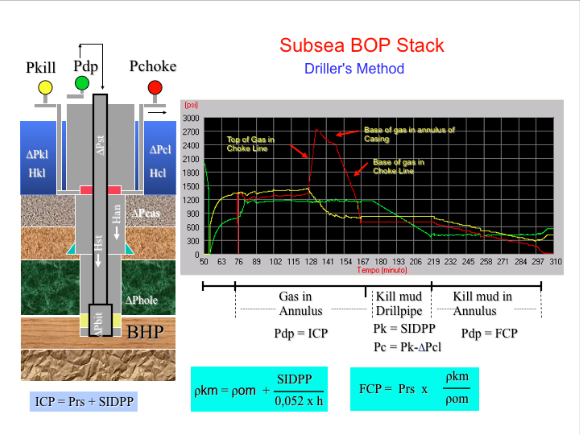
The control method to be applied is the driller’s method. That is to circulate the influx even with the original weight of the mud, keeping constant the circulation pressure named ICP – Initial Pressure Circulation. The second circulation should be made with the kill mud weight in two steps:
1. Fill the drill string until the bit by keeping the pressure at the Choke (at the KILL, on subsea stack) constant and equal to SIDPP.
2. Complete circulation of the annular to the surface keeping the pressure of circulation with the kill mud constant named FCP – Final Circulation Pressure. On subsea stack, after the choke fully open, the pump pressure increases until FCP 2.

Attention: about drill bit off bottom

This method should only be applied with the drill bit in the bottom hole or when the kick is completely in annular of the drill string. To minimize errors of calculation of the kill mud weight, the calculations made in this application considers the depth of the drill bit instead of the depth of the well to calculate the kill mud weight.
The formation pressure consider the depth of well. In case of top of the kick bellow the bit, it is recommended to apply the volumetric method until kick go through the drill bit to the annular, following then the driller’s method.

Formulas:

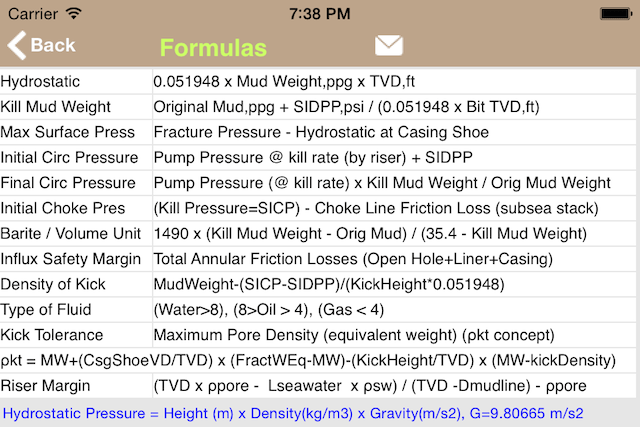
ICP = Pks + SIDPP

  ICP =  Inital Circulation Pressure, psi
  Pks = Recorded pump pressure at the kill rate speed, psi
  SIDPP = Shut-in Drillpipe Pressure, psi

  Notes about floating units:
     a) Pks must be recorded by circulating riser;
     b) Record the friction loss in the choke line at the kill rate speed, psi;

KM = OM + SIDPP / (0.052 x TVD)

 KM = Kill Mud Weight, ppg
 OM = Original Mud Weight, ppg
 TVD = True Vertical Depth, ft

FCP = Pks x KM / OM

   FCP = Final Circulation Pressure, psi

FCP 2 = (Pks + ΔPcl) x KM / OM

   FCP 2 - Final Circulation Pressure with Kill Mud at Choke, psi
   ΔPcl - Choke Line Friction, psi


Summary of method

STEPS PUMP PRESSURE KILL PRESSURE CHOKE PRESSURE VOLUME TO PUMP
Bring the pump to kill speed SICP SICP – Choke line friction loss
Circulate out the influx to surface ICP Bit to Surface
Circulate to fill drill string with kill mud SIDPP SIDPP – Choke line friction loss Surface to Bit
Circulate to fill annular with kill mud FCP Bit to Surface

Formulas used in calculations of this method:

  WCMethods_Formulas1

Screenshot from WCMethods:

WCM1_DM_01

WCM1_DM_02

Example in Well Control Simulator:

Screenshot from Well Control Simulator for iPhone and iPod Touch:

Wells with Surface Stack

Driller’s Method

surfacedmxstk2


Wait and Weight Method (Engineer’s Method)

surfacewwxstk2

Wells with Subsea Stack

Driller’s Method

subseadmxstk2

Wait and Weight Method (Engineer’s Method)

subseawwxstk2


Importing Data from other Apps:


Well Control
Simulator
iPhone | iPad

Drilling
Simulator
iPhone | iPad

Leak-Off Test
Simulator
iPhone | iPad

Kick Tolerance
iPhone | iPad
Mac OS X

Drilling Hydraulics
iPhone | iPad
Mac OS X


Well Control Methods HD (for iPad):

WCM2_DM_04
WCM2_DM_01
WCM2_DM_02
WCM2_DM_03

Well Control Methods for Mac:

WCM3_DM_01
WCM3_DM_02
WCM3_DM_03
WCM3_DM_04

Visit our Portfolio on the App Store for more Oil & Gas apps for iPhone, iPod Touch, iPad and Mac OS X.

portfolio

Visit our website for more Oil & Gas apps for iPhone, iPod Touch, iPad and Mac OS X.

wellcontrol_url.png

contact@wellcontrol.com.br

http://www.wellcontrol.com.br