Page 9 of 10

Drilling Hydraulics for Mac OS X 2.0 now available on the Mac App Store: New features and improvements

Drilling Hydraulics for Mac OS X 2.0

DH3_20_01

resized__135x40_Download_on_the_App_Store_Badge_US-UK_135x40_0824_1

The Drilling Hydraulics provides the driller, tool pushers, drilling engineers, chemists, students and other professionals in the petroleum industry a productivity tool helpful in drilling of oil wells for hydraulics calculations, optimization of the penetration rate and can help on the decision on selection of bit nozzles.Features:1. Defining the parameters of the well, drill string, drill bit, mud (fluid), mud pumps, circulation lines on surface, diameter and coefficient of choke and more;
2. Options outstanding: Injecting into the drill string with the return flowline or by injecting the kill line to return the choke;
3. Options wells in floating units or in drilling landing rigs;
4. Use of two mud pumps in parallel (total 04 mud pumps)
5. Choice of rheological models (Bingham and Power);
6. Calculations of the hydraulic drill bit and the system by friction;
7. Frictional losses in all sections, also showing the length, velocity, flow regime and Reynolds number in each section.
8. Calculation of the ECD on bottom hole and the casing/liner shoe with TVD;
9. Hydrostatic calculations at the bottom hole and the casing/liner shoe with TVD;
10. Calculation of bottoms up time;
11. View for Hydraulics Optimization: Pressure x Flow rate chart with touchscreen and rotation (portrait / landscape) and scale definition. Ability to change bit depth or bit TFA for instantaneous plotting.
12. Selecting the system of units: METRIC, SI, FIELD 1 (Imperial) and FIELD 2 (mix).
13. Load / Save Data File.
14. Drillstring sections: Drill pipe 1, Drill pipe 2, Heavy Weight, Drill Collar 1 and Drill Collar 2.
15. Well sections: Riser, Casing, Liner and Open Hole;
16. Ability to select Qty / Size of Jet Nozzles of Drillbit.
17. Option for Bit TFA fixed;
18. Ability to send Hydraulics reports by email;
19. Circulating Kill Line -> Choke;
20. Directional basics Hydrostatic calculations (Bottom Hole , Casing Shoe, Liner Top and Liner Shoe TVD and Measured Depth)
21. Booster Line
22. Drilling Motor (Entry of the Pressure Drop Across Motor by user)

New in this update 2.0:

– Added two mud pumps (total 04);
– Added booster line pump;
– Added Drilling Motor (Entry of the Pressure Drop Across Motor by User, using Motor Performance Curves chart);
– Ability to select units also per parameter;
– Ability to import well data from other apps;
– Recalculate DP as necessary to surface automatically with bit on bottom when editing BHA or Well Depth;
– Added option to select velocity unit to #/min or #/sec;
– On circulation by kill, option to select return by riser or choke.
– Show temperature on Celsius, Fahrenheit, Kelvin and Rankine.

DH3_20_02
DH3_20_09
DH3_20_09
DH3_20_09
DH3_20_09
DH3_20_09
DH3_20_09
DH3_20_09
DH3_20_09

wellcontrol_url.png

contact@wellcontrol.com.br

http://www.wellcontrol.com.br

Updates to All Apps for iPhone, iPod Touch and iPad submitted to the App Store – Send by Email / Open in

All Apps for iPhone, iPod Touch and iPad

 *** Now Available ***

All_Apps

New in these updates:

– Send data file by email;
– Open in… (on Mail App and file managers apps)
– Backup and Restore data files with iTunes File Sharing.

On iPhone and iPod Touch 

0_Send_by_email___iPhone

0_Open_in_iPhone

On iPad

0_Send_by_email___iPad

0_Open_in_iPad

iTunes File Sharing

0_iTunes_File_Sharing

Drilling Simulator for iPhone 1.3 submitted to the App Store: iCloud, iOS6 and several improvements

Drilling Simulator for iPhone and iPod Touch 1.3

*** Now Available on the App Store *** 

DrillSim1_13_new_icon

resized__135x40_Download_on_the_App_Store_Badge_US-UK_135x40_0824_1

Features:

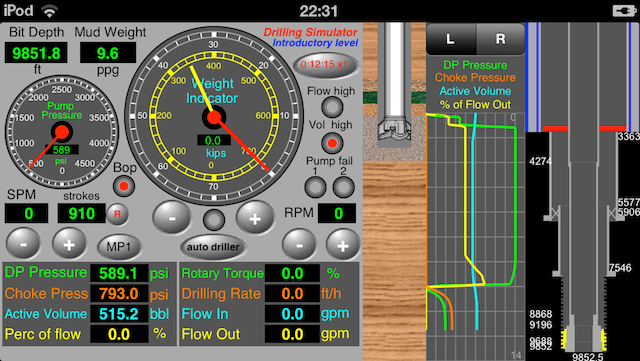
1) Panel with the following parameters: pump pressure, mud pump speed, strokes totalizer, flow rate, mud weight, bit depth, rotary speed, hookload and weight on the bit;
2) Instruments with pointers to the parameters: pump pressure, hookload, weight on the bit and rotary torque;
3) Geolograph with parameters: drillpipe pressure, choke pressure, active volume, hookload, weight on the bit, length drilled, flow in, flow out, percent of flow, rotary torque, rotary speed and drilling rate.
4) Panel with alarms: pump failure, vol high, flow high, bop failure, bop status and choke status;
5) Toolbar with buttons: Well Config, Circulation Options, Set Alarms, Graph Limits, X-times faster, Pause/Continue, Restart, Send by email, about;
6) set drillstring with drillpipe1, drillpipe2, heavy-weight, drillcollar1 and drillcollar2;
7) Select floating rig or land rig;
8) Select unit systems: International, field1 (imperial) and field2 (mix);
9) set fluid parameters: mud weight, plastic viscosity, yield point and initial gel;
10) Select rheological models: Power or Bingham;
11) Set gradients: absorption, fracture and temperature;
12) Set jet nozzles or fixed TFA;
13) Set choke parameters and BOP test pressure;
14) Set Surface circulation volume;
15) Set surface circulation equipments (mud pump and lines);
16) Set four formations to drilling (height, pore gradient, fluid density and sof/hard);
17) Save configuration to data files and share by iCloud;
18) Select circulation options: drillpipe -> Riser, Kill -> Riser, and Close BOP;
19) Set alarms: pit gain, flow rate out, max pump pressure and max pump power;
20) Register the kill line losses and pump pressure at the kill speed;
21) show the well with drillstring and the drillbit on rotating;
22) Show schematic of well with drillstring, kick and neutral point (%);
23) Adjust pump speed, weight on the bit and rotary speed to drilling until kick detection;
24) Shut-in the well using hard method;
25) Register shut-in drillpipe pressure (SIDPP) and choke pressure (SICP) and gain volume;
26) behavior of the kick: keeping the well closed and keeping the well opened;
27) Simulations: Drilling, Kick detection, Shut-In, Underground Blowout at shoe and blowout with failure of bop;
28) Capacities and Volumes calculations;
29) Hydrostatic and critical pressures calculations;
30) Hydraulics calculations;
Note: This Drilling Simulator NOT allows to control the well after the kick detection and shut-in. The simulation ends after the simulations of underground blowout and blowout to surface.

New in this update 1.3: 

  • – iCloud support;
  • – iOS 6 support;
  • – Retina display support to printing and email attachments;
  • – Improved performance: Graph updated to 120 minutes;
  • – Added Drillp Pipe 2, Drill Collar 2 and Liner;
  • – Added Auto Driller;
  • – Abilitiy to use 03 mud pumps (one for booster line);
  • – Ability to use directional well (kop, md,tvd).
  • – Selection of units also per parameter;
  • – Ability to import well data from other apps using iCloud;
  • – The well drilled, detected kick and closed can be imported from app “well control simulator” to control;
  • – Recalculate DP as necessary to surface automatically with bit on bottom when editing BHA or Well Depth;
  • – Revision of the code;
  • – Several improvements

Screenshot on iPhone 4

DS1i4_13_02

The following screenshots were taken on iPod 5th gen (iPhone 5 larger display) 

Drill, detect kick, close the well and wait for stabilization of the pressures:

DS1_13_02

 Screenshot in real size on iPod Touch 5th gen (640×1136)

DS1_13_02B

Import by iCloud from the app “Well Control Simulator” to control:

Well Control Simulator for iPhone (new version 1.2)

 WCS1_12_08 WCS1_12_09

WCS1_12_10

Well Control for iPad (new version 1.2)

WCS2_12_08

WCS2_12_09

WCS2_12_10

Other Screenshots of the Drilling Simulator

DS1_13_06 DS1_13_05
DS1_13_07 DS1_13_08
DS1_13_03 DS1_13_04
DS1_13_09 DS1_13_10

wellcontrol_url.png

contact@wellcontrol.com.br

http://www.wellcontrol.com.br

Drilling Simulator for iPad 1.3 submitted to the App Store: iCloud, iOS 6 and several improvements

Drilling Simulator for iPad 1.3

*** Awaiting approval by Apple *** 

DS2_13_01

resized__135x40_Download_on_the_App_Store_Badge_US-UK_135x40_0824_1

Features:

1) Panel with the following parameters: pump pressure, mud pump speed, strokes totalizer, flow rate, mud weight, bit depth, rotary speed, hookload and weight on the bit;
2) Instruments with pointers to the parameters: pump pressure, hookload, weight on the bit and rotary torque;
3) Geolograph with parameters: drillpipe pressure, choke pressure, active volume, hookload, weight on the bit, length drilled, flow in, flow out, percent of flow, rotary torque, rotary speed and drilling rate.
4) Panel with alarms: pump failure, vol high, flow high, bop failure, bop status and choke status;
5) Toolbar with buttons: Well Config, Circulation Options, Set Alarms, Graph Limits, X-times faster, Pause/Continue, Restart, Send by email, about;
6) set drillstring with drillpipe1, drillpipe2, heavy-weight, drillcollar1 and drillcollar2;
7) Select floating rig or land rig;
8) Select unit systems: International, field1 (imperial) and field2 (mix);
9) set fluid parameters: mud weight, plastic viscosity, yield point and initial gel;
10) Select rheological models: Power or Bingham;
11) Set gradients: absorption, fracture and temperature;
12) Set jet nozzles or fixed TFA;
13) Set choke parameters and BOP test pressure;
14) Set Surface circulation volume;
15) Set surface circulation equipments (mud pump and lines);
16) Set four formations to drilling (height, pore gradient, fluid density and sof/hard);
17) Save configuration to data files and share by iCloud;
18) Select circulation options: drillpipe -> Riser, Kill -> Riser, and Close BOP;
19) Set alarms: pit gain, flow rate out, max pump pressure and max pump power;
20) Register the kill line losses and pump pressure at the kill speed;
21) show the well with drillstring and the drillbit on rotating;
22) Show schematic of well with drillstring, kick and neutral point (%);
23) Adjust pump speed, weight on the bit and rotary speed to drilling until kick detection;
24) Shut-in the well using hard method;
25) Register shut-in drillpipe pressure (SIDPP) and choke pressure (SICP) and gain volume;
26) behavior of the kick: keeping the well closed and keeping the well opened;
27) Simulations: Drilling, Kick detection, Shut-In, Underground Blowout at shoe and blowout with failure of bop;
28) Capacities and Volumes calculations;
29) Hydrostatic and critical pressures calculations;
30) Hydraulics calculations;

Note: This Drilling Simulator NOT allows to control the well after the kick detection and shut-in. The simulation ends after the simulations of underground blowout and blowout to surface.

New in this update 1.3: 

  • – iCloud support;
  • – iOS 6 support;
  • – Retina display support to printing and email attachments;
  • – Improved performance: Graph updated to 120 minutes;
  • – Added Drillp Pipe 2, Drill Collar 2 and Liner;
  • – Added Auto Driller;
  • – Abilitiy to use 03 mud pumps (one for booster line);
  • – Ability to use directional well type slant.
  • – Selection of units also per parameter;
  • – Ability to import well data from other apps using iCloud;
  • – The well drilled, detected kick and closed can be imported from app “well control simulator” to control;
  • – Ability to use the iPad on landscape position on all views;
  • – Recalculate DP as necessary to surface automatically with bit on bottom when editing BHA or Well Depth;
  • – Revision of the code;
  • – Several improvements

 Drill, detect kick, close the well and wait for stabilization of the pressures:

DS2_13_02B

 Import by iCloud from the app “Well Control Simulator” to control:

Well Control for iPad  (new version 1.2)

WCS2_12_08

WCS2_12_09

WCS2_12_10

Other Screenshots of the Drilling Simulator

DS2_13_03

DS2_13_04

DS2_13_05

DS2_13_06

DS2_13_07

wellcontrol_url.png

contact@wellcontrol.com.br

http://www.wellcontrol.com.br

Drilling Cost for iPhone and iPod Touch 2.3 now available on the App Store: iOS6 and iPhone5

Drilling Cost for iPhone and iPod Touch 2.3

DC1_22_01

Download on the App Store

New in this version:

– Support for iOS 6 and iPhone 5;
– Improved printing and attachments with retina display
– Improvements with gestures on data tables

DC1_24_01_1

The Drilling Cost provides to the drillers, toolpushers, drilling engineers, students and other professionals in the petroleum industry a productivity tool helpful in drilling operation to calculate the drilling cost per length unit drilled, analize of drill bit performance and to use in planning phase of oil wells.

Formula:

Drilling Cost = (Bit Cost + Rig Cost x (Drilling Time + Trip Time)) ÷ (Length Drilled)

Drilling Cost => drilling cost $ per length unit ($/ft, $/m)
Bit Cost => bit cost, $
Rig Cost => rig cost per hour, $ / hour
Drilling Time => total drilling time, hour
Trip Time => trip time, hour
Length Drilled => total length drilled by drill bit, ft or m

The Advanced Feature:

This application provides an advanced feature that is the modeling of data Drilling Cost vs. Drilling Time using quadratic regression. The minimum point of the parable may correspond to the operation time of the drill bit, where will occur the minimum cost. The more the R squared is close to 1, the result will be better.

Quadratic regressions:

1) Drilling Cost = c + b (LD) + a (LD)*(LD), LD = total Length Drilled by the dril bit
2) Drilling Cost = c + b (DT) + a (DT)*(DT), DT = total drilling time by the drill bit

DC1_22_03 DC1_22_08
DC1_22_06 DC1_22_07
DC1_22_09 DC1_22_05

wellcontrol_url.png

contact@wellcontrol.com.br

http://www.wellcontrol.com.b

Directional Drilling Survey for iPhone, iPod Touch and iPad 2.4 now available on the App Store

Directional Drilling Survey for iPhone, iPod Touch and iPad 2.4

DDS_150x150

for iPhone and iPod Touch for iPad for Mac (2.3)
Download on App Store Download on App Store available on Mac App Store

New in the update 2.4:

1. Support for iOS 6 and iPhone 5;
2. Support for Retina Display (Best resolution to printing and email attachments);

Screenshots: iPhone 4 / iPhone 5

DDS1_24_01

DDS1_24_02

Printing with Retina Display (New)

DDS1_24_06

Printing without Retina Display

DDS1_24_05

Email attachment with Retina Display (New)

DDS1_24_04

Email attachment without Retina Display

DDS1_24_03

wellcontrol_url.png

contact@wellcontrol.com.br

http://www.wellcontrol.com.br

Oil and Gas Apps for iPhone, iPod Touch, iPad and Mac: Importing data from other apps using iCloud

Oil and Gas Apps for iPhone, iPod Touch, iPad and Mac 

New in the next updates: Importing data from other apps using iCloud

 DH2_28_09
DH2_28_10

The apps are being updated with a new feature to import data from other apps using iCloud.

The Drilling Hydraulics App is ready to submit to App Store with these new features:

1- Support for iOS 6;
2- Added two mud pumps (total 04);
3- Added booster line;
4- Added Drilling Motor (Entry of the Pressure Drop Across Motor by User, using Motor Performance Curves chart);
5- Ability to select units per parameter;
6- Ability to import well data from other apps;
7- Improvements to print views;
8- Ability to use the iPad on landscape position on all views;
9- Recalculate DP as necessary to surface automatically with bit on bottom when editing BHA or Well Depth;
10- Added option to select velocity unit to #/min or #/sec;
11- On circulation by kill, option to select return by riser or choke.
12- Added column in well configuration with internal volume for each pipe section;

This is the best time for suggestions and bug reports.

We are updating all apps with support for iOS 6 and iPhone 5.

On the next weeks, We will submit the new versions of the apps for approval by apple.

– Drilling Simulator
– Drilling Hydraulics
– Drilling Cost
– Well Control Simulator
– Well Control Methods
– Well Control Worksheets
– Kick Tolerance
– Leak-Off Test Simulator
– Leak-Off Test Analyzer
– Directional Drilling Survey

Oil & Gas Apps on the App Store

contact@wellcontrol.com.br

http://www.wellcontrol.com.br

wellcontrol_url.png

Oil and Gas Apps for iPhone, iPod Touch, iPad and Mac: Improvements to select units of measurement

Oil and Gas Apps for iPhone, iPod Touch, iPad and Mac

New in the next updates: improvements to select units of measurement

Oil & Apps for iOS

The apps are being updated with a new feature to select units of measurement based per parameter instead of selection per unit system. 

This is the best time for suggestions and bug reports.
We are updating all apps with support for iOS 6 and iPhone 5.

On the next weeks, We will submit the new versions of the apps for approval by apple.

– Drilling Simulator
– Drilling Hydraulics
– Drilling Cost
– Well Control Simulator
– Well Control Methods
– Well Control Worksheets
– Kick Tolerance
– Leak-Off Test Simulator
– Leak-Off Test Analyzer
– Directional Drilling Survey

Oil & Gas Apps on the App Store

contact@wellcontrol.com.br
http://www.wellcontrol.com.br

wellcontrol_url.png

Updates to Well Control Apps (Methods, Worksheets and Simulator) submitted to App Store

Well Control Apps

Submitted new versions to App Store for approval by Apple

New in these versions: Sharing data files with iCloud 


Well Control Methods   Well Control Worksheets Well Control Simulator
WC3_150x150.png WCWS_150 WCS_144
Versions for iPad,

iPhone and iPod Touch

Versions for iPad

and for Mac

Versions for iPad,

iPhone and iPod Touch


 Oil & Gas Apps for iOS

(iPhone, iPod Touch and iPad)

Oil & Gas Apps for OS X

(iMac and Macbook)

resized__120x45_available_appstore_icon_ mac_app_store

wellcontrol_url.png

contact@wellcontrol.com.br

More details at http://www.wellcontrol.com.br

Drilling Cost for iPhone and iPod Touch 2.2 now available on App Store: iCloud Support

Drilling Cost for iPhone and iPod Touch 2.2

DC1_22_01

available_appstore_icon_

New in the next version 2.2:

Sharing Data File with iCloud.

DC1_22_02 DC1_22_02A

The Drilling Cost provides to the drillers, toolpushers, drilling engineers, students and other professionals in the petroleum industry a productivity tool helpful in drilling operation to calculate the drilling cost per length unit drilled, analize of drill bit performance and to use in planning phase of oil wells.

Formula:

Drilling Cost = (Bit Cost + Rig Cost x (Drilling Time + Trip Time)) ÷ (Length Drilled)

Drilling Cost => drilling cost $ per length unit ($/ft, $/m)
Bit Cost => bit cost, $
Rig Cost => rig cost per hour, $ / hour
Drilling Time => total drilling time, hour
Trip Time => trip time, hour
Length Drilled => total length drilled by drill bit, ft or m

The Advanced Feature:

This application provides an advanced feature that is the modeling of data Drilling Cost vs. Drilling Time using quadratic regression. The minimum point of the parable may correspond to the operation time of the drill bit, where will occur the minimum cost. The more the R squared is close to 1, the result will be better.

Quadratic regressions:

1) Drilling Cost = c + b (LD) + a (LD)*(LD), LD = total Length Drilled by the dril bit
2) Drilling Cost = c + b (DT) + a (DT)*(DT), DT = total drilling time by the drill bit

DC1_22_03 DC1_22_04
DC1_22_06 DC1_22_07
 DC1_22_09 DC1_22_05
 wellcontrol_url.png

contact@wellcontrol.com.br

http://www.wellcontrol.com.br