Page 12 of 21


Drilling Simulator for iPad User Guide


Leak-Off Test Analyzer for Mac OS X 1.4 submitted to the Mac App Store
Leak-Off Test Analyzer for Mac OS X
*** Now available on the Mac App Store ***


| For iPhone and iPod Touch | For iPad |
 |
|
This app provides for Technicians, Drillers, Toolpushers, Drilling Engineers, Students and others professionals of the oil industry a very helpfull tool to analysis and use during the performing of the leak-off test in wellsite.
For new features, report bugs, improvements and suggestions please contact us: contact@wellcontrol.com.br
About the Leak-off Test on drilling operations:
A test to determine the strength or fracture pressure of the open formation, usually conducted immediately after drilling below a new casing shoe.
Initially, pumping fluid into the borehole results in volumetric compression of the drilling mud column and elastic expansion of the casing string plus rock around the borehole. As the pressure in the borehole increases, the leak-off pressure (LOP) is reached when the relationship between pressure increase and volume of fluid pumped deviates from linear. This occurs when fluid begins to diffuse into the formation at a more rapid rate as the rock begins to dilate. Generally, a LOT is a test that finishes immediately after LOP is reached.
Features:
- Intuitive graphical interface;
- Ability to work with data files locally and on iCloud;
- Set ranges for graph;
- Graph Options:
- – Surface Pressure and Volume Pumped versus Pumping Time;
- – Surface Pressure and Pumping Time versus Volume Pumped;
- Data edition (add, edit/save, insert, remove);
- Ability to print report with data and graph;
- Click and move mouse in the graph area to obtain Surface Pressure, Equivalent Density, Equivalent Gradient, Volume Pumped and Pumping Time.
- Option to select unit systems: Metric, SI, Field1 (Imperial) and Field2 (mix);
- Selection of units also per parameter;
- Option to select time unit: sec or min;
- Autosave for Description, Unit System, Time Unit (sec/min)
New in this update 1.4 (Mac version only):
– Fix calculation factor for volume unit on the Metric and SI unit Systems.

 |
 |
 |
 |

Share this:

Oil & Gas Apps for Mac OS X
Oil & Gas Apps for Mac OS X
A few years ago, we searched for applications in the area of oil and gas for Mac OS X and not found. Then, we develop these applications and we would like to share with friends.
We would like to share our portfolio with very low cost applications to drillers, tool pushers, engineers, chemists, students and other professionals in the petroleum industry. These are productivity tools helpful in drilling of oil wells.
These apps are completely interactive and allow users to define a wide variety of parameters for oil wells and unit system, save data, share them with friends.
These Apps are available on the Mac App Store, only.
Well Control Methods |
Well Control Worksheets |
Kick Tolerance
|


Share this:

Well Control Worksheets for iPad 1.5 – Import data from other apps on iCloud
Well Control Worksheets for iPad 1.5
*** Now available on the App Store ***


This application uses the worksheets based on standardized worksheets of the methods to control oil wells after the occurrence of kick during drilling operations on floating rigs with subsea stack and rigs with surface stack.
This app is great for use in the offices: Toolpusher, drilling engineer, company man, technicians, superintendent and OIM.
It can be used on the rig (offices) by drilling staff and also help in the understanding of the methods of well control.
Well Control Worksheets for Methods:
- Driller’s Method
- Wait and Weight Method
– Option to select “Subsea Stack” or “Surface Stack”
– Option to Select Unit Systems: METRIC, SI, IMPERIAL and MIX
– Selection of units also per parameter
– Printing and attachments with retina display
– Ability to use gestures
New in this update:
– Ability to import data from apps on iCloud to fill the worksheets:
 Well Control Simulator iPhone | iPad |
 Drilling Simulator iPhone | iPad |
 Leak-Off Test Simulator iPhone | iPad |
 Well Control Methods iPhone | iPad Mac OS X |
 Kick Tolerance iPhone | iPad Mac OS X |
 Drilling Hydraulics iPhone | iPad Mac OS X |
Importing data from Well Control Simulator
 |
 |
 |
 |
 |
 |
 |
 |
 |
Tap on the Title of the frames to edit Parameters
 |
 |
 |
 |
Share this:

Well Control Worksheets for Mac OS X 1.5 – Import data from other apps on iCloud
Well Control Worksheets for Mac OS X 1.5
*** Now available on the Mac App Store ***

This application uses the worksheets based on standardized worksheets of the methods to control oil wells after the occurrence of kick during drilling operations on floating rigs with subsea stack and rigs with surface stack.
This app is great for use in the offices: Toolpusher, drilling engineer, company man, technicians, superintendent and OIM.
It can be used on the rig (offices) by drilling staff and also help in the understanding of the methods of well control.
Well Control Worksheets for Methods:
- Driller’s Method
- Wait and Weight Method
- Option to select “Subsea Stack” or “Surface Stack”
- Option to Select Unit Systems: METRIC, SI, IMPERIAL and MIX.
- Selection of units also per parameter
- Sharing data files via iCloud ou by email.
New in this update:
– Ability to import data from apps on iCloud to fill the worksheets:
Well Control Methods iPhone | iPad Mac OS X |
Kick Tolerance iPhone | iPad Mac OS X |
Drilling Hydraulics iPhone | iPad Mac OS X |
and also from apps for iOS (iPhone, iPod Touch and iPad)
Well Control Simulator iPhone | iPad |
Drilling Simulator iPhone | iPad |
Leak-Off Test Simulator iPhone | iPad |
Importing data from other apps
 |
New screenshots:
 |
 |
 |
 |
 |
Share this:

Well Control Worksheets for iPad 1.5 – Import data from other apps on iCloud
Well Control Worksheets 1.5
*** Coming Soon ***

This application uses the worksheets based on standardized worksheets of the methods to control oil wells after the occurrence of kick during drilling operations on floating rigs with subsea stack and rigs with surface stack.
This app is great for use in the offices: Toolpusher, drilling engineer, company man, technicians, superintendent and OIM.
It can be used on the rig (offices) by drilling staff and also help in the understanding of the methods of well control.
Well Control Worksheets for Methods:
– Driller’s Method
– Wait and Weight Method
Others:
– Option to select “Subsea Stack” or “Surface Stack”
– Option to Select Unit Systems: METRIC, SI, IMPERIAL and MIX
– Selection of units also per parameter
– Printing and attachments with retina display
– Ability to use gestures
New in this update:
– Ability to import data from apps on iCloud to fill the worksheets:
Importing data from Well Control Simulator
|
|
 |
 |
 |
 |
 |
 |
 |
Other screenshots from previous version
 |
 |
 |
 |
Share this:

Well Control Simulator for iPhone and iPod Touch 1.4 now available on the App Store: Improvements
Well Control Simulator for iPhone and iPod Touch 1.4
Now available on the App Store


Features:
Well Control Simulator Provides a graphical very useful tool for training of roughnecks, derrickmen, drillers, tool pushers, drilling engineers and students in the well control procedures.
– Interactive System: no pre-set methods;
– Ability to apply methods: Driller’s method, wait and weight, dynamic volumetric and static volumetric (lubricate and bleed);
– Capacities and Volumes;
– Hydraulics and Hydrostatics and critical pressures calculations;
– Behavior of the kick;
– Applied with subsea stack and surface stack;
Kick Model:
The model assumes that the kick starts as a single bubble and migrates upward as a single bubble from the bottom to the surface.
Notes:
- For simulation of drilling and kick detection, use another app “Drilling Simulator“.
- For simulation of leak-off test, use another app “Leak-Off Test Simulator“;
- For methods to control, use another app “Well Control Methods“;
- For kick tolerance calculations, use another app “Kick Tolerance“;
- For hydraulic calculations, use another app “Drilling Hydraulics“;
New in this update 1.4:
- Improved Stability;
- Improved Well Configuration;
- Improved the work with data files;
- Added button to reset kick
- Fix bug to reset fracture
New screenshots
 |
 |
 |
Other screenshots
Driller’s Method:


Wait and Weight Method:


 |
 |
 |
 |
 |
 |
Share this:

Drilling Simulator for iPhone and iPod Touch 1.5 now available on the App Store: Improvements
Drilling Simulator for iPhone and iPod Touch 1.5
Now available

Features:
1) Panel with the following parameters: pump pressure, mud pump speed, strokes totalizer, flow rate, mud weight, bit depth, rotary speed, hookload and weight on the bit;
2) Instruments with pointers to the parameters: pump pressure, hookload, weight on the bit and rotary torque;
3) Geolograph with parameters: drillpipe pressure, choke pressure, active volume, hookload, weight on the bit, length drilled, flow in, flow out, percent of flow, rotary torque, rotary speed and drilling rate.
4) Panel with alarms: pump failure, vol high, flow high, bop failure, bop status and choke status;
5) Toolbar with buttons: Well Config, Circulation Options, Set Alarms, Graph Limits, X-times faster, Pause/Continue, Restart, Send by email, about;
6) set drillstring with drillpipe1, drillpipe2, heavy-weight, drillcollar1 and drillcollar2;
7) Select floating rig or land rig;
8) Select unit systems: International, field1 (imperial) and field2 (mix);
9) set fluid parameters: mud weight, plastic viscosity, yield point and initial gel;
10) Select rheological models: Power or Bingham;
11) Set gradients: absorption, fracture and temperature;
12) Set jet nozzles or fixed TFA;
13) Set choke parameters and BOP test pressure;
14) Set Surface circulation volume;
15) Set surface circulation equipments (mud pump and lines);
16) Set four formations to drilling (height, pore gradient, fluid density and sof/hard);
17) Save configuration to data files and share by iCloud;
18) Select circulation options: drillpipe -> Riser, Kill -> Riser, and Close BOP;
19) Set alarms: pit gain, flow rate out, max pump pressure and max pump power;
20) Register the kill line losses and pump pressure at the kill speed;
21) show the well with drillstring and the drillbit on rotating;
22) Show schematic of well with drillstring, kick and neutral point (%);
23) Adjust pump speed, weight on the bit and rotary speed to drilling until kick detection;
24) Shut-in the well using hard method;
25) Register shut-in drillpipe pressure (SIDPP) and choke pressure (SICP) and gain volume;
26) behavior of the kick: keeping the well closed and keeping the well opened;
27) Simulations: Drilling, Kick detection, Shut-In, Underground Blowout at shoe and blowout with failure of bop;
28) Capacities and Volumes calculations;
29) Hydrostatic and critical pressures calculations;
30) Hydraulics calculations;
Note: This Drilling Simulator NOT allows to control the well after the kick detection and shut-in. The simulation ends after the simulations of underground blowout and blowout to surface.
Notes:
- For well control simulations, use another app “Well Control Simulator“.
- For simulation of leak-off test, use another app “Leak-Off Test Simulator“;
- For methods to control, use another app “Well Control Methods“;
- For kick tolerance calculations, use another app “Kick Tolerance“;
- For hydraulic calculations, use another app “Drilling Hydraulics“;
New in this update:
- Improved Stability
- Improved Well Configuration
- Improved the work with data files
- Added reset buttons for reset kick, fracture and graph
|
 |
Other Screenshots (Current versions)
Screenshot on iPhone 4

The following screenshots were taken on iPod 5th gen (iPhone 5 larger display)
Drill, detect kick, close the well and wait for stabilization of the pressures:
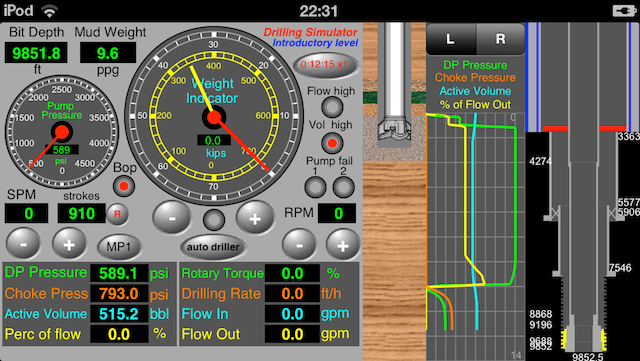
Screenshot in real size on iPod Touch 5th gen (640×1136)

Import by iCloud from the app “Well Control Simulator” to control:
Well Control Simulator for iPhone (new version 1.2)
  |
Well Control for iPad (new version 1.2)


Other Screenshots of the Drilling Simulator
 |
 |
 |
 |
|
|
Share this:

Drilling Simulator for iPad 1.5 now available on the App Store: Improvements
Drilling Simulator for iPad 1.5
Now available

Features:
1) Panel with the following parameters: pump pressure, mud pump speed, strokes totalizer, flow rate, mud weight, bit depth, rotary speed, hookload and weight on the bit;
2) Instruments with pointers to the parameters: pump pressure, hookload, weight on the bit and rotary torque;
3) Geolograph with parameters: drillpipe pressure, choke pressure, active volume, hookload, weight on the bit, length drilled, flow in, flow out, percent of flow, rotary torque, rotary speed and drilling rate.
4) Panel with alarms: pump failure, vol high, flow high, bop failure, bop status and choke status;
5) Toolbar with buttons: Well Config, Circulation Options, Set Alarms, Graph Limits, X-times faster, Pause/Continue, Restart, Send by email, about;
6) set drillstring with drillpipe1, drillpipe2, heavy-weight, drillcollar1 and drillcollar2;
7) Select floating rig or land rig;
8) Select unit systems: International, field1 (imperial) and field2 (mix);
9) set fluid parameters: mud weight, plastic viscosity, yield point and initial gel;
10) Select rheological models: Power or Bingham;
11) Set gradients: absorption, fracture and temperature;
12) Set jet nozzles or fixed TFA;
13) Set choke parameters and BOP test pressure;
14) Set Surface circulation volume;
15) Set surface circulation equipments (mud pump and lines);
16) Set four formations to drilling (height, pore gradient, fluid density and sof/hard);
17) Save configuration to data files and share by iCloud;
18) Select circulation options: drillpipe -> Riser, Kill -> Riser, and Close BOP;
19) Set alarms: pit gain, flow rate out, max pump pressure and max pump power;
20) Register the kill line losses and pump pressure at the kill speed;
21) show the well with drillstring and the drillbit on rotating;
22) Show schematic of well with drillstring, kick and neutral point (%);
23) Adjust pump speed, weight on the bit and rotary speed to drilling until kick detection;
24) Shut-in the well using hard method;
25) Register shut-in drillpipe pressure (SIDPP) and choke pressure (SICP) and gain volume;
26) behavior of the kick: keeping the well closed and keeping the well opened;
27) Simulations: Drilling, Kick detection, Shut-In, Underground Blowout at shoe and blowout with failure of bop;
28) Capacities and Volumes calculations;
29) Hydrostatic and critical pressures calculations;
30) Hydraulics calculations;
Note: This Drilling Simulator NOT allows to control the well after the kick detection and shut-in. The simulation ends after the simulations of underground blowout and blowout to surface.
Notes:
- For well control simulations, use another app “Well Control Simulator“.
- For simulation of leak-off test, use another app “Leak-Off Test Simulator“;
- For methods to control, use another app “Well Control Methods“;
- For kick tolerance calculations, use another app “Kick Tolerance“;
- For hydraulic calculations, use another app “Drilling Hydraulics“;
New in this update 1.5:
- Improved Stability;
- Improved Well Configuration;
- Improved the work with data files;
- Added button to reset kick and fracture
New Screenshots (version 1.5)
 |
 |
 |
Drill, detect kick, close the well and wait for stabilization of the pressures:

Import by iCloud from the app “Well Control Simulator” to control:
Well Control for iPad (new version 1.2)
Other Screenshots of the Drilling Simulator


contact@wellcontrol.com.br

 Well Control
You must be logged in to post a comment.